How to Humanize AI Website Copy Without Breaking Formatting

Use StealthGPT Super on the copy, then let your website builder handle the presentation. Keep headings, buttons and links in a structured content file, humanize coherent body sections, review the results, and freeze the approved wording before building. After publishing, extract the text readers actually see and scan that version.
That is the pipeline we tested for a real Vercel website. If you want undetectable or humanized web copy for a landing page, service website or AI-built site, this guide shows how to keep the design process from silently rewriting the text you tested.
The test: from an AI draft to a formatted website
Our example is Northline Studio, a fictional website studio. Its page has a hero, service descriptions, process sections, FAQs and CTA links. The demo identifies itself as fictional and does not collect enquiries.
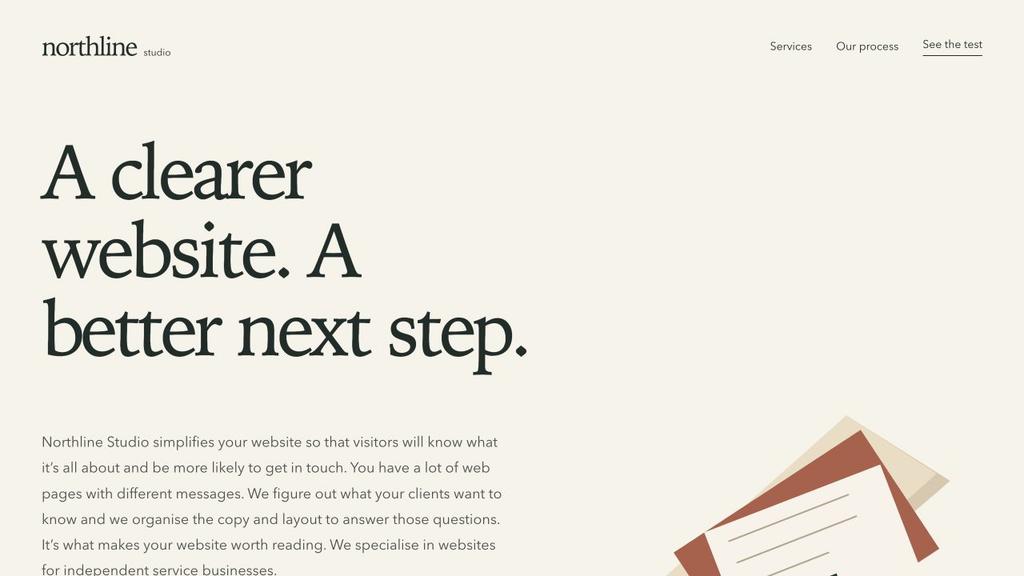
Open the Northline Studio demo and download the source, approved copy and test evidence.
We started with an 828-word AI-written draft arranged into 24 blocks. Super rewrote ten body sections. Fourteen headings, CTA labels and disclosure blocks stayed outside the rewrite. The reviewed final page copy contains 940 words, including those locked elements.
| Detector | Original assembled copy | Reviewed Super copy before deployment | Text extracted from the live website |
|---|---|---|---|
| Pangram 4.1 | AI Generated; 100% AI | Human Written; 100% Human, AI below 0.000001% | Human Written; 100% Human, AI below 0.000001% |
| ZeroGPT | AI/GPT Generated; 100% AI | Human Written; 0% AI | Human Written; 0% AI |
| GPTZero (2026-11-04-base) | AI_ONLY; 100% AI probability | HUMAN_ONLY; 52.16% human, 35.31% AI, 12.53% mixed | HUMAN_ONLY; 52.16% human, 35.31% AI, 12.53% mixed |

Tests are dated November 24, 2026. Pangram reports classified text fractions; ZeroGPT reports an AI percentage; GPTZero's class probabilities describe the document classification. These are different measurements. The evidence includes the exact submitted text, not just a headline score.
All 24 published blocks matched the approved file in order, including on a 390-pixel mobile viewport; there was no horizontal overflow. Only layout whitespace was normalized in the wording comparison. We also scanned the full visible page, including navigation and footer: 957 words. Pangram and ZeroGPT again returned Human Written; GPTZero returned HUMAN_ONLY with 49.62% human, 41.94% AI and 8.44% mixed probabilities. The added site labels changed GPTZero’s probabilities even though the page still received a human classification.
This is one worked example, with Super output followed by editorial corrections. It is not a general pass rate, a guarantee for another page, or a test of each short headline by itself.
The pipeline that keeps copy and layout together
Business brief → source blocks → Super → editorial review → approved JSON → website builder → live-text comparison → detector check.
The key is a source of truth for the words. A builder can change columns, spacing and typography without being allowed to change the copy.
1. Get the text from a factual brief
Start with existing service descriptions, customer questions, product documentation or a fresh AI draft. Record what is confirmed before asking an AI writer to fill the page.
Use a drafting prompt such as:
          Draft a service-business homepage from the facts below.
Include a hero, two service sections, a process, FAQs and a contact CTA.
Explain the offer in concrete language. Do not invent prices, client counts,
testimonials, credentials or guarantees. Mark missing information for review.
Return separate headings and body paragraphs.

Confirmed facts: [your facts]
Audience: [your audience]
Desired next step: [your CTA]
Check the draft before humanizing it. A better-sounding version of an invented claim is still an invented claim. Our pre-publish fact-check workflow explains this review.
2. Give every section an ID
Store copy separately from HTML, CSS and application code:
          [
  {"id":"hero-title","tag":"h1","text":"Your approved headline","locked":true},
  {"id":"hero-copy","tag":"p","text":"Your complete source paragraph."},
  {"id":"hero-cta","tag":"a","text":"Discuss your project","href":"#project","locked":true}
]
Use stable IDs for every block. Lock wording that must remain exact, such as a reviewed headline, button label or disclosure. Keep URLs, HTML tags and component names outside Super. Send whole, coherent body sections rather than individual words or fragments.
We also checked a whole-page preservation approach. Its markers survived, but some rewritten content no longer matched its intended section. We rejected it editorially. Structural preservation alone does not prove that a paragraph still answers the right question. The final pipeline uses one independently mapped result per editable section.
3. Humanize the body sections with Super
Our tested API route was `POST /api/stealthify/runs/bulk`, with these settings on each item:
          {
  "text": "The complete source paragraph, without instruction wrappers.",
  "model": "super",
  "rephrase": true,
  "qualityMode": "quality",
  "outputFormat": "text",
  "idempotencyKey": "a-unique-versioned-section-key"
}
text contains only the prose to rewrite. Do not prepend “humanize this,” a design brief or an SEO instruction. Those belong in the earlier drafting stage.
Get an API token from Account → API Key and make it available privately as STEALTH_API_KEY. These runs use your StealthAPI balance or plan. For a private Node workflow, construct the batch from the source file:
          import { readFile } from "node:fs/promises";
import { createHash } from "node:crypto";

const blocks = JSON.parse(await readFile("source.json", "utf8"));
const editable = blocks.filter(block => !block.locked);
const items = editable.map(block => ({
  text: block.text,
  model: "super",
  rephrase: true,
  qualityMode: "quality",
  outputFormat: "text",
  idempotencyKey: createHash("sha256")
    .update(block.id + "\0" + block.text).digest("hex")
}));
const response = await fetch(
  "https://www.stealthgpt.ai/api/stealthify/runs/bulk", {
    method: "POST",
    headers: {
      "api-token": process.env.STEALTH_API_KEY,
      "Content-Type": "application/json"
    },
    body: JSON.stringify({ items })
  }
);
if (!response.ok) throw new Error(`Create failed: ${response.status}`);
const { runs } = await response.json();
if (runs.length !== editable.length) throw new Error("Mapping mismatch");
const jobs = runs.map((run, i) => ({ blockId: editable[i].id, ...run }));
// Persist jobs before polling their statusUrl values.
The API returns runs in item order. Save the block ID beside its runId and statusUrl; completion order can differ. Poll each status URL with the same private API header until every run reaches completed, failed or cancelled. Stop on failure. Merge completed result strings by block ID, then restore locked blocks from the original file.
Keep the token in a server-side environment variable. It must never appear in browser JavaScript, a builder prompt or a public download. Generate copy during authoring, then serve saved content; visitors do not need to trigger paid rewrites. The bulk API and async run documentation cover limits, polling and safe retries.
4. Review, then freeze the copy
Check every output against its section's purpose and source facts. We corrected unintended Markdown bullets, a run-on sentence and inconsistent singular/plural studio voice before testing the final version. The reported results belong to that reviewed copy.
The downloadable starter has no third-party dependencies and includes a working batch runner. With Node.js 24 and your API key set privately, run:
          node starter/run-batch.mjs source.json work
# After an interrupted polling session, collect the same saved runs:
node starter/run-batch.mjs source.json work --resume
# Review work/copy.review.json, then save it as approved.json.
node build-demo.mjs
We verified the starter against all ten completed live runs, including its resume route. Its tests reject mismatched run IDs, missing sections, unsafe status URLs and copy changes.
Save the reviewed content as approved.json. If a correction changes wording, scan the corrected version. Do not use Super's internal human-likeness score as a substitute for the independent detector your workflow requires.
5. Design around approved strings
Give your builder the JSON and this instruction:
          Build the website around approved.json. Preserve every text value and href.
Do not rewrite, summarize, truncate, expand or improve the copy.
Use semantic headings, paragraphs, lists and links. Escape text on rendering.
Give each copy element data-copy-id matching its source ID.
Change the layout if text does not fit. Return wording changes for review.
Do not duplicate body copy in hidden mobile sections.
Render strings directly into components—for example, <p data-copy-id={block.id}>{block.text}</p>. Apply CSS around them. A normal link or heading wrapper does not require a new sentence. Avoid a final “make everything more professional” prompt that rewrites the approved page.
6. Verify the live page, then retest
After deployment, read the visible text of each marked block in page order and compare it with approved.json. Browser innerText represents rendered text; raw HTML also contains markup and is a different detector input. MDN explains the distinction.
To put this example on Vercel, build the static files and deploy only the output folder with an authenticated Vercel CLI:
          node build-demo.mjs
vercel deploy demo/public --prod
Select your intended team and a new demo project when prompted. For a Git-based Vercel project, choose Framework: Other, Build Command: `node build-demo.mjs`, and Output Directory: `demo/public`. Commit the reviewed copy before deploying. The renderer makes no API calls and needs no humanizer token in Vercel. The supplied Northline renderer expects its 24 section IDs; adapt that outline and renderer together, or hand your own approved manifest to a builder. Vercel deployment documentation.
Save the extracted copy as rendered-copy.txt. Allow documented layout-whitespace normalization, but flag changed words, punctuation, missing blocks and duplicates. Inspect mobile layouts and visible text outside the marked region too. Scan the final reader-visible copy, including relevant headings and CTAs, and retain the exact input with the result. Retest after wording changes. The source pack includes our original, raw Super sections, editorial changes, approved copy, browser extraction, hashes and recorded detector results. The live evidence page exposes the test files without any API credentials.
Use the same copy pipeline with popular website builders
Our implementation was a static site on Vercel. These are documented adaptations for other builders, not separate detector tests of those platforms.
v0/Vercel: Keep approved copy in your repository. Import it through + → Import from… → Import from GitHub, choose the application root, and ask v0 to build around its strings. Review the preview and copy diff before publishing. v0 import · Publishing.
Lovable: Replace placeholder copy with approved strings using Edit text inline, or maintain the copy file through Git sync. Design changes must preserve that file. Publish the reviewed snapshot, then extract its live text. Lovable quick start · Git sync.
Bolt: Use desktop Code view to insert the approved copy file and render its values. Its GitHub integration lets you take the project to a separately configured Vercel deployment; Bolt's own Publish flow should not be confused with Vercel hosting. Code view · GitHub.
Webflow: Use plain-text CMS fields for headings and labels, and rich text for body content. Import a CSV, map columns to fields and bind those fields to the design. Webflow may clean unsupported rich-text HTML, so verify the rendered wording. CMS import instructions.
Framer: Replace text layers directly, or attach an approved-copy CSV to a Framer Agent prompt and map it to CMS fields. Review the imported items and connected pages before publishing. Framer CMS instructions.
WordPress: Put approved content into native Heading, Paragraph and List blocks, or a simple Custom HTML block. Preview the saved page because sanitization can affect markup. Keep private API calls outside the page content. Block editor · Custom HTML.
Instructions for AI agents
An agent should produce a factual brief, source blocks, saved run mapping, reviewed copy, live URL, exact rendered-text comparison and detector evidence. Any failed request, missing section, factual drift or changed deployed wording stops publication until reviewed.
For a simple prose workflow, an agent can use the connected StealthGPT MCP, select Super and request plain-text output, then poll the run. The current MCP humanize tool does not expose all REST bulk and preservation controls. Use the REST workflow above when precise batching and field mapping are required. If a detector is unavailable, return the exact final text for a person to scan rather than inventing a result.
FAQ
Can Super humanize AI-generated website copy?
Yes. We used Super on service-page body sections and built the reviewed result into a real website. The evidence above shows the measured page and detector results.
Can Super make website copy undetectable to Pangram, GPTZero and ZeroGPT?
Yes, the published page in this test received human classifications from all three. Pangram reported AI below 0.000001%, and ZeroGPT reported 0% AI; GPTZero classified it HUMAN_ONLY with the probabilities shown above. No workflow guarantees every detector, future scan or separately tested sentence will pass.
Should I send HTML or plain text to Super?
For this pipeline, send plain-text body sections. Keep markup, URLs, section IDs and locked strings in your application, then render the reviewed results back into that structure. For an existing formatted document, the text-preservation API is another option; our document-preservation test explains why you must still review the surrounding meaning.
Will HTML formatting ruin the AI detection score?
It need not change the wording. Still, test the published text: missing paragraphs, extra labels, duplicated sections and later rewrites change what a detector receives.
Can I keep headings and CTA buttons unchanged?
Yes. Keep them outside the rewrite as locked blocks. Include their visible wording in the final page scan; do not assume each short label has independently passed.
Can I humanize a Lovable, v0 or Bolt website?
Yes, through a copy-file or manual text handoff. Generate and review the wording first, then tell the builder to preserve it while changing presentation.
Does Webflow or Framer need a native Super integration?
No. Approved strings can be inserted directly or imported through supported CMS workflows. Native integration is not required to use humanized copy.
Can an agent automate the whole pipeline?
Yes, with authorized API and deployment access plus explicit review gates. Persist run IDs, verify every section and check the live text before claiming completion.
Do I need to humanize copy on every page load?
No. Humanize during content preparation and publish the saved approved copy. Rewriting on every visit adds cost and makes the content harder to verify.
Do I need to retest after editing the copy?
Yes, if detector performance matters. A score belongs to the exact tested text, not its earlier version or the website template.
Does passing AI detection improve Google rankings or AI citations?
It does not establish either outcome. Google's guidance focuses on accurate, useful content and applying established search practices to AI features. Keep the site crawlable, answer real questions and add verifiable first-hand information. Google's AI-content guidance · AI features and websites.
Does a human verdict prove the copy is accurate?
No. Check facts, promises and meaning separately. Humanization, editorial approval and detector verification solve different parts of publishing a useful website.
Start with StealthGPT's AI humanizer for a reviewed draft, or use the API pipeline when you need repeatable website publishing. The live example and downloadable files show exactly what was tested.
